Aronium POS mobile companion

Your Aronium POS, Wherever You Go.

Aronium POS Mobile App for Android

AroWhere is an independent mobile companion for Aronium POS that helps you stay connected to your shop from your Android phone.

Android v1.0.5 · Windows Connector v1.1.3

Also on Google Play

Independent companion for Aronium Lite & supported Aronium setups — not an official Aronium product.
Secure Google sign-in
Read-only POS connector
Access away from the shop
New-sale notifications
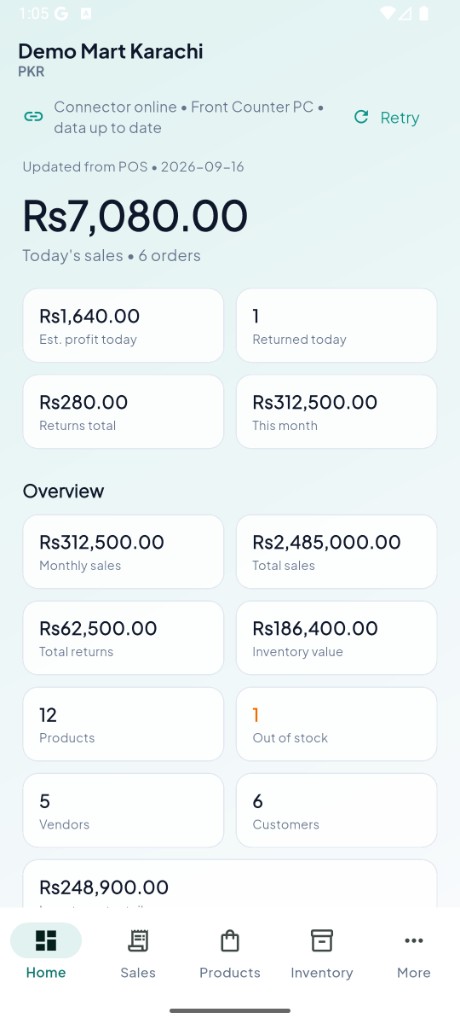
AroWhere home dashboard with today's sales

What is AroWhere?

Access Your Aronium POS From Your Phone

AroWhere is an Aronium mobile companion for businesses that want a convenient way to stay informed about their shop from an Android phone.

Instead of being tied to the Windows computer running Aronium, this Aronium Android app experience lets you view important business information — sales, products, inventory, customers and reports.

  • Aronium remains your POS system.
  • AroWhere works alongside Aronium — it does not replace it.
  • The Windows connector communicates with your Aronium installation.
  • The Android app displays the information you need on the go.

AroWhere is an independent companion application for Aronium POS and is not affiliated with or officially endorsed by Aronium.

The problem

Your business doesn't stop when you leave the POS.

Many Aronium users run their POS on a Windows computer in the shop. Owners and managers are not always sitting in front of that screen — but they still want to know what is happening.

Away from the shop

You are not always sitting in front of your Aronium POS computer.

No mobile view

Important Aronium information is primarily available where your POS is running.

Missed activity

You may want to know when a new sale happens without constantly checking the computer.

The solution

Meet your Aronium mobile companion.

AroWhere brings important Aronium information to your Android phone, helping you stay informed without constantly checking the POS computer.

Aronium POS
AroWhere Connector
Secure cloud sync
Android app

Mobile access

Stay connected from your phone.

Sales visibility

See sales activity on the go.

Products & inventory

Check what you sell and stock levels.

New-sale alerts

Notifications when sales sync in.

How it works

How AroWhere Works

Aronium POS → AroWhere Connector → AroWhere cloud → Android phone.

1

Install AroWhere

Install the Android application on your phone.

2

Install the Connector

Install the AroWhere Connector on the Windows computer where Aronium is installed.

3

Sign in

Sign in with the same account on the Android app and the connector.

4

Stay connected

AroWhere receives relevant information from your Aronium installation and displays it on your phone.

Features

What You Can Do With AroWhere

A clear mobile view of the Aronium information you care about most — sales, inventory, customers and reports.

View Sales

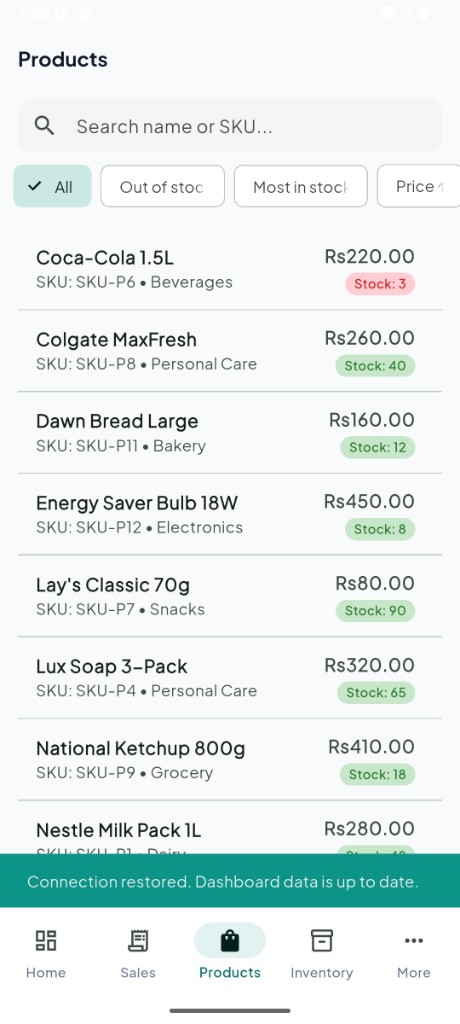
View Aronium sales information from your POS on your phone. Aronium sales

Check Products and Inventory

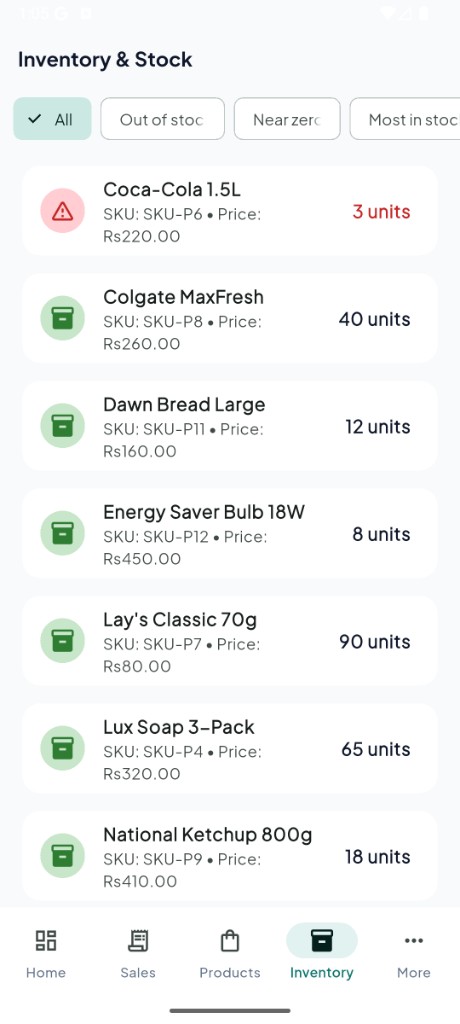
Access product and Aronium inventory details without opening the POS computer. Aronium inventory

View Customers

View customer information from your mobile device.

View Reports

See dashboard-style Aronium reports and activity while away from the counter. Aronium reports

Receive New Sale Notifications

Receive notifications when new sales sync from Aronium.

Inventory visibility

Keep an eye on Aronium inventory while away from the POS.

Incremental updates

When supported by the connector, relevant changes are synced instead of resending everything.

Simple connection

Connect the Android app and Windows connector with the same account.

Aronium compatibility

Built as an Independent Aronium Companion

AroWhere is designed to work alongside Aronium POS and provide a mobile companion experience for supported installations. It is not an official Aronium product.

Aronium Lite

Aronium Pro

Compatibility details are maintained in site configuration and updated as versions are verified. AroWhere does not claim support for every Aronium version.

Aronium + AroWhere

Aronium runs your POS. AroWhere keeps you connected.

AroWhere is not a competitor to Aronium — it is a mobile companion.

Aronium AroWhere
Desktop POSMobile companion
Sales managementMobile sales visibility
Product managementMobile product information
Inventory managementMobile inventory visibility
Customer managementMobile customer access
Runs your POSKeeps you informed

Mobile app showcase

Designed for a clear glance at your Aronium business.

Real screens from the AroWhere Android app.
AroWhere dashboard with today's sales
Dashboard
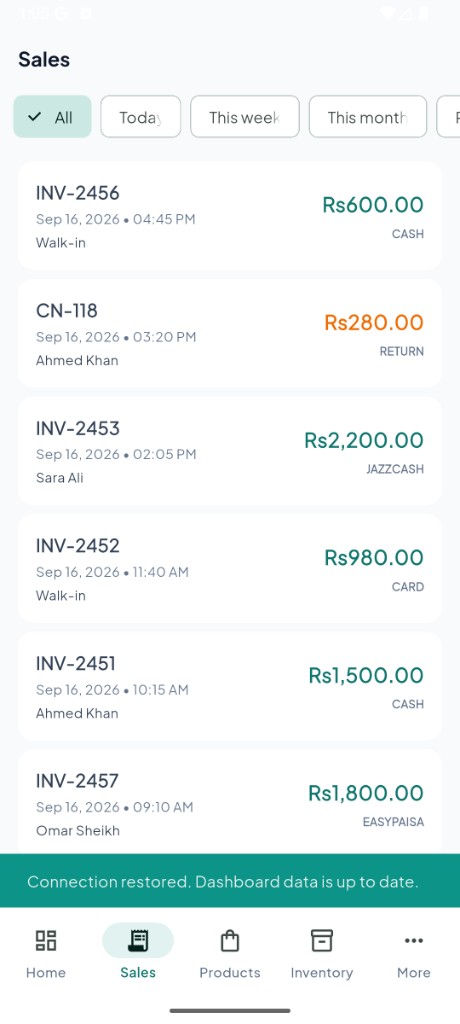
AroWhere sales list with invoices and payments
Sales
AroWhere products with prices and stock
Products
AroWhere inventory and stock levels
Inventory
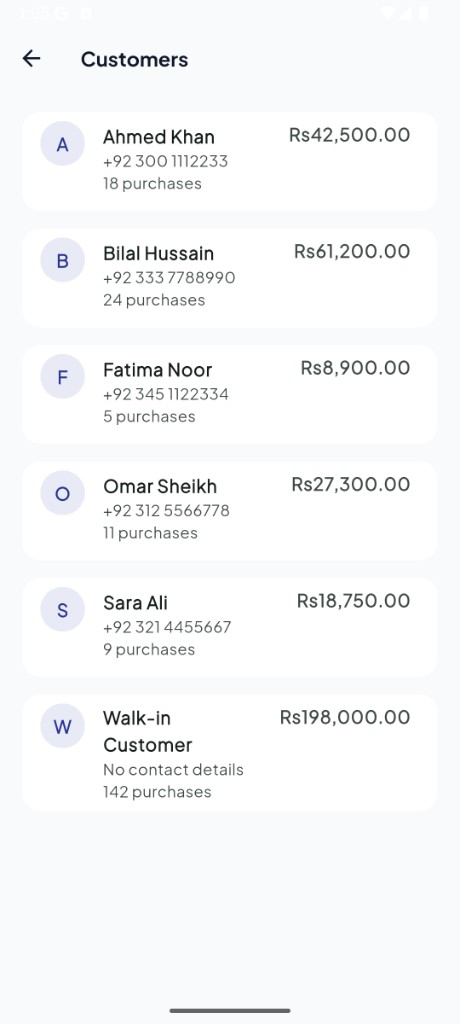
AroWhere customers with purchase totals
Customers
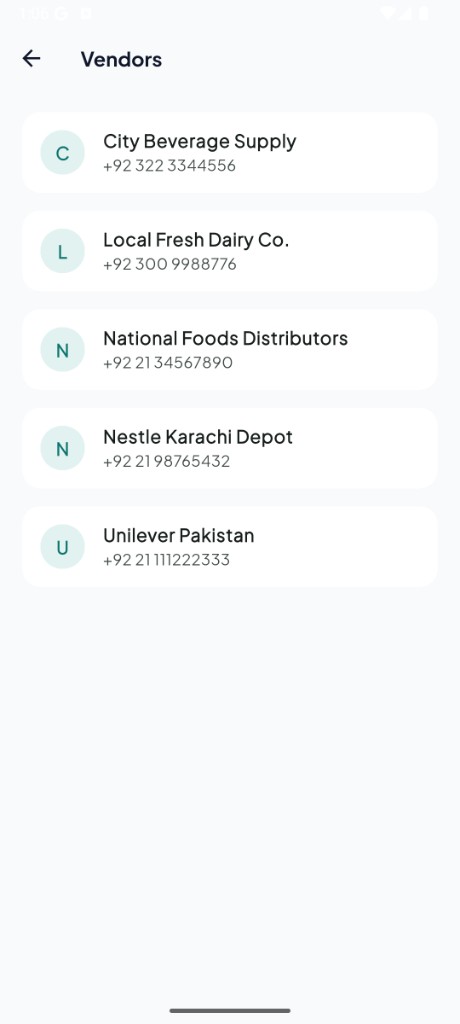
AroWhere vendors and supplier contacts
Vendors

Privacy & data

Your POS. Your Data.

AroWhere is designed to work with your existing Aronium installation without modifying your Aronium database.

  • The Windows connector reads the information needed for the mobile experience.
  • AroWhere is not designed to modify your existing Aronium database.
  • Synced business information is stored in AroWhere’s cloud backend so you can access it from your phone when the connection is set up — including when you are away from the shop.
  • The Android app displays information received through your signed-in account.
Read Privacy Policy

FAQ

Frequently Asked Questions

Common questions about the Aronium mobile app experience with AroWhere. Full list on the FAQ page.

What is AroWhere?
AroWhere is a mobile companion for Aronium POS. It helps you view important business information — such as sales, products, inventory, and customers — from an Android phone while Aronium continues to run your point of sale.
Is AroWhere an official Aronium app?
No. AroWhere is an independent companion application for Aronium POS and is not affiliated with or officially endorsed by Aronium.
Does AroWhere work with Aronium POS?
Yes. AroWhere is designed to work alongside Aronium POS using the AroWhere Windows Connector on the computer where Aronium is installed.
What is Aronium?
Aronium is point-of-sale and business management software used by retailers and hospitality businesses to run sales, products, inventory, and related operations on a computer.
Can I view Aronium sales on my phone?
Yes. After the connector syncs your store, you can view Aronium sales information in the AroWhere Android app.
Can I check Aronium inventory from my phone?
Yes. AroWhere can show Aronium inventory information synced from your POS so you can check stock while away from the shop.
Can I view Aronium reports on Android?
Yes. AroWhere includes a mobile dashboard with sales and related Aronium reports from your installation.
How does AroWhere connect to Aronium?
Install the AroWhere Connector on the Windows PC running Aronium, sign in with the same account used in the Android app, and sync. See how it works for the full steps.
Does AroWhere replace Aronium?
No. AroWhere is designed to work alongside Aronium. Aronium remains your POS system; AroWhere helps you stay informed from your phone.
Does AroWhere work with Aronium Lite?
AroWhere is designed for supported Aronium Lite installations on Windows via the AroWhere Connector. Compatibility is updated as versions are verified — see the compatibility section on this page.
Does AroWhere work with Aronium Pro?
The connector can detect Aronium Pro. Full Pro sync coverage may vary by installation. Check current release notes / the compatibility notes on this site for what is verified.
Is AroWhere available on Android?
Yes. The AroWhere mobile application is designed for Android.
Do I need a Windows computer?
Yes for the current setup. The AroWhere Connector is designed for Windows computers where Aronium POS is installed.
Do I need to install anything on my Aronium computer?
Yes. You install the AroWhere Connector on the Windows PC that runs Aronium so it can read and sync the information your mobile app displays.
Does AroWhere modify my Aronium database?
The connector is designed to read the required information from your Aronium installation and is not intended to modify the existing Aronium database.
Can I receive notifications for new sales?
Yes. When notifications are enabled and your account connection is active, AroWhere can notify you when new sales sync from Aronium.
Does my Aronium computer need to be running?
The connector needs to run on the Windows PC to send updates from Aronium. After data has synced, you can still view previously synced information in the Android app. Fresh activity requires the connector (and typically the PC) to be online.
Is my data stored in the cloud?
Yes. AroWhere uses a cloud backend so signed-in users can access synced Aronium business information from the Android app. Access is tied to your account and store permissions. See the Privacy Policy for details.
Can I use AroWhere from outside my shop?
Yes. Once your connector has synced information to AroWhere’s cloud backend, you can open the Android app from outside the shop using your account — you do not need to be on the same local network as the POS computer.
How do I install AroWhere?
Install the Android app on your phone, install the Windows Connector on the computer running Aronium, sign in with the same account on both, and complete connector setup so your store can sync.
How can I contact support?
For support, email me directly at iamalishan@gmail.com .

Download

Take Aronium with you.

Stay connected to your POS from your Android phone.

Android v1.0.5 · Windows Connector v1.1.3

Android APK and Windows Connector download from GitHub Releases.

For support, email me directly at iamalishan@gmail.com.

0Setup steps
0Windows connector
24/7Stay informed on mobile